Early accessEXIM & customs operations
PortWhizz
AI that knows when not to guess.
PortWhizz reads a shipment’s documents (commercial invoice, packing list, bill of lading, certificate of origin) and assembles a structured Bill of Entry checklist for licensed customs brokers to review, with the source attached to every value.
Scene 1 of 6
A customs broker retypes all of this.
Every job starts as a bundle: commercial invoice, bill of lading, packing list, certificate of origin and the importer’s IEC, GST and PAN documents.
Transcript
- A shipment bundle: commercial invoice, bill of lading, packing list, certificate of origin and importer registration documents (IEC, GST, PAN).
- The PortWhizz logo.
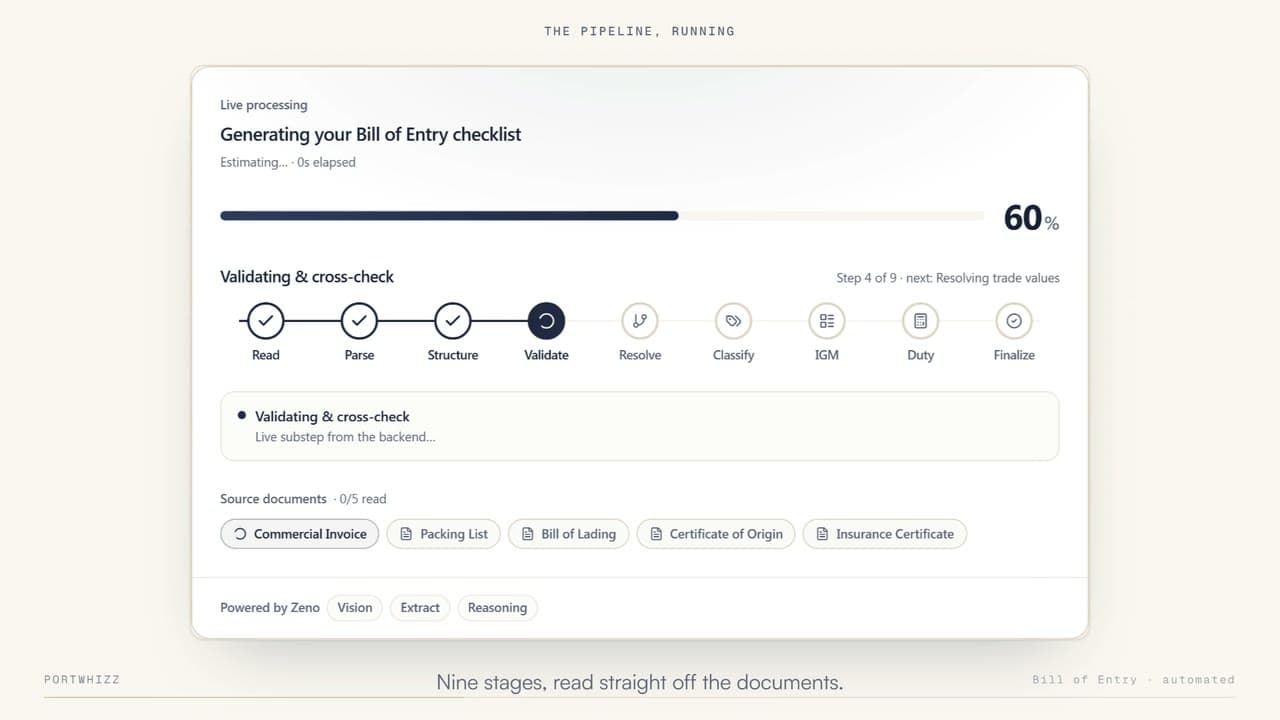
- “The pipeline, running”: the Bill of Entry checklist is generated in nine stages (Read, Parse, Structure, Validate, Resolve, Classify, IGM, Duty, Finalize), powered by Zeno for vision, extraction and reasoning.
- “Nine stages, read straight off the documents.”
- “Duty, resolved to the notification”: BCD, Social Welfare Surcharge and IGST lines, each with its notification reference, summing to the Bill of Entry gross total.
- “208 fields. One document.”: the finished Bill of Entry for Home Consumption checklist.
- “Documents in. Bill of Entry out.”
Scene 2 of 6
Upload the PDFs. Get the Bill of Entry.
The whole bundle goes in together, each document in its own slot.
Scene 3 of 6
Nine stages, read straight off the documents.
Read, Parse, Structure, Validate, Resolve, Classify, IGM, Duty and Finalize, with Zeno handling vision, extraction and reasoning.
Scene 4 of 6
Duty, resolved to the notification.
BCD, Social Welfare Surcharge and IGST lines, each with its notification reference, summing to the Bill of Entry gross total.
Scene 5 of 6
208 fields. One document.
The finished Bill of Entry for Home Consumption checklist, ready for the broker to review against its sources.
Scene 6 of 6
Documents in. Bill of Entry out.
Every value keeps its source. Anything the paperwork doesn’t support stays blank and flagged, never guessed.
Customs work starts with paperwork
The information a broker needs is already in the shipment’s documents. Getting it out, accurately, is where the hours go.
- 01
Every customs job starts as a bundle of documents in unrelated layouts.
- 02
Finding each value, checking it, re-keying it and chasing what’s missing is the work itself.
- 03
Once a value is typed into a checklist, the link to the page it came from is gone.
Read the shipment as a whole
PortWhizz reads the bundle as a set rather than file by file, and keeps every value attached to the page it came from.
- Commercial invoiceINV
- Packing listPL
- Bill of ladingBL
- Certificate of originCOO
- IEC · GST · PANIEC
Uploaded together, each in its own slot, read in parallel.
- Read
- Parse
- Structure
- Validate
- Resolve
- Classify
- IGM
- Duty
- Finalize
Born-digital PDFs are parsed directly; scans go through OCR and vision. Values are cross-checked across documents.
- Invoice value← Commercial invoiceresolved
- Country of origin← Certificate of originresolved
- Gross weight← Packing listresolved
- Port of loading← Bill of ladingreview
- AD code← Its own authoritative source onlywaiting
208 fields in the demo’s checklist. Each one keeps its source; gaps stay blank and flagged.
A licensed customs broker checks each field against the source shown beside it, then generates the checklist PDF.
PortWhizz prepares the work. It doesn’t sign for it.
- Step 01
Upload the shipment bundle
Commercial invoice, packing list, bill of lading, certificate of origin and supporting documents go in together, each in its own slot, and are read in parallel.
- Step 02
Read each document the right way
Born-digital PDFs are parsed directly; scans go through OCR and vision. Values are extracted, structured and cross-checked against the other documents.
- Step 03
Assemble the checklist
Values are mapped into the Bill of Entry checklist with IGM details resolved, and every field carries a status: resolved, review, waiting or blocked.
- Step 04
Review with the source beside it
The broker checks each field against the source document shown next to it, then generates the checklist PDF.
AI that knows when not to guess
If the paperwork supports it, extract it. If it doesn’t, don’t invent it. If it needs judgement, flag it.
The provenance chain
- Document
- Page
- Value
- Checklist field
- 01Every value has a source
- Provenance is built into the data model, not added to the UI afterwards.
- 02It refuses to guess
- If the paperwork supports a value, PortWhizz extracts it. If it doesn’t, the field stays blank and is flagged. A wrong value that looks confident is worse than a gap.
- 03Source-priority rules
- Fields such as the IGM number, AD code, and bond and EPCG particulars come only from their own authoritative source, or not at all.
- 04Built for licensed operators
- PortWhizz prepares the work; it does not sign for it. It assists licensed customs brokers and does not replace their regulatory responsibility.
One shipment file, built layer by layer
Exactly where each module stands today. We don’t publish dates for modules that aren’t live.
Customs checklist
Extracts values from shipment documents, links each one to its source, flags missing data and supports broker review.
Duty assessment
A reviewable duty calculation: assessable value, exchange-rate handling and each duty component, with a calculation log.
FTA & preferential origin
Reads certificates of origin, identifies the trade agreement and compares preferential duty with MFN duty.
Shipping Bill (export) checklist
Bringing the export side to parity with the Bill of Entry checklist.
Freight forwarding
Live with a pilot user. Quote desk, instant quotes, client quote links, rate sourcing, container tracking, a control tower and vendor reconciliation for ocean freight forwarders.
EPCG & Advance Authorisation
Recognises licences, extracts licence details and tracks duty foregone, export obligations and expiry.
e-Sanchit document preparation
PDF/A conversion, a signing workflow and filing-readiness checks; final signing stays with the authorised operator.
Importer & supplier masters
Reads IEC, GSTIN and PAN once, checks them for consistency, and maintains importer and supplier records.
Post-clearance visibility (ULIP)
Road-leg movement data and a shared importer–broker timeline after the shipment leaves the port. Requires ULIP access.
Built first for customs brokers
PortWhizz is in early access with customs brokers, the Shipping Bill checklist serves exporters, and the freight-forwarding module is live with a pilot user. Importer workflows follow on the same shipment file.
- Early access
Customs brokers
Faster job setup, multi-document review and source tracing on every checklist.
- In development
Importers
Shared visibility into captured information, gaps, assessment and filing progress.
- Live
Freight forwarders & exporters
Quotes, rate sourcing, tracking and reconciliation for forwarders, and export checklists for exporters.
Built for ocean freight forwarders
From the enquiry email to the vendor invoice: quotes, rate sourcing, container tracking, exceptions and reconciliation on the same shipment record. Scroll, and each module’s demo plays in turn.
LiveLive with a pilot user · 10 modules
Quote desk
An email becomes a reviewed enquiry — never a guess.
Inbound enquiry emails are read by AI with a confidence score on every field, and nothing becomes an enquiry until a person signs off.
Transcript
- “An email becomes a reviewed enquiry — never a guess.”
- “Email to reviewed enquiry”: enquiries counted as needs review (4), to source (2), sourcing (1) and ready to quote (3).
- AI extraction with field confidence: port of loading CNSHA at 98%, commodity “General cargo” at 61%, flagged for review.
- “Nothing is created without a person signing off.”
- PortWhizz, built for ocean freight forwarders.
Instant quote
Price your own lane. Seconds. Not an email thread.
A shipper prices a lane in seconds instead of an email thread, sees each option with its transit time, and every offer carries an expiry.
Transcript
- “Price your own lane. Seconds. Not an email thread.”
- “Shippers price their own lane”: three options on CNSHA → INNSA, $1,180 in 24 days (lowest), $1,340 in 19 days (fastest) and $1,295 in 22 days (standard).
- Validity: the offer expires in 18:42, then it lapses.
- “No sourced rate? It says so — never an invented number.”
- PortWhizz, built for ocean freight forwarders.
Quote builder
Move one slider. Buy, sell and margin move with it.
Move one markup slider and the sell price and gross margin follow; mandatory accessorials are added automatically, and the server does the maths.
Transcript
- “Move one slider. Buy, sell and margin move with it.”
- “Buy and sell, moving together”: buy $1,180, sell $1,357, markup 15.0%, gross margin 13.04%.
- Mandatory accessorials are auto-added: THC added, and removing it needs a reason.
- “Nothing is computed in the browser — the server does the math.”
- PortWhizz, built for ocean freight forwarders.
Client quote link
Send a quote. The client opens one link. That’s it.
Send a quote as a single link the client opens without an account; views are counted only on an explicit request, never a mail scanner’s prefetch.
Transcript
- “Send a quote. The client opens one link. That’s it.”
- “No account required”: quote Q-10234.pdf stays a draft until sent, and the quote link shows “Accepted by Priya Shah”.
- View tracking: a prefetch by a mail scanner is ignored, not counted as a view.
- “A view only counts on an explicit request — never a scanner’s prefetch.”
- PortWhizz, built for ocean freight forwarders.
Rate sourcing
Contract rates. Vendor replies. One grid, ranked.
Contract rates and vendor replies land in one grid, ranked as they arrive, with one RFQ email per trucker per leg.
Transcript
- “Contract rates. Vendor replies. One grid, ranked.”
- “Rates ranked the moment they land”: MSC $1,180 in 24 days (cheapest), ONE $1,340 in 19 days (fastest) and Maersk $1,295 in 22 days.
- RFQ, one email per trucker, per leg: a trucker reply received and awaiting review.
- “Expired, stale and unpriced options are shown with the reason they weren’t ranked.”
- PortWhizz, built for ocean freight forwarders.
Container tracking
One container number. A timeline that doesn’t lie about free time.
One container number gives a milestone timeline and its Last Free Day status, with the free-time clock starting at actual discharge.
Transcript
- “One container number. A timeline that doesn’t lie about free time.”
- “A timeline that doesn’t lie”: gate in, loaded and departed CNSHA done; discharged INNSA next.
- Container KMTU7476738, Last Free Day: status at risk, 2 days left.
- “The free-time clock starts at actual discharge — never an assumption.”
- PortWhizz, built for ocean freight forwarders.
Control tower
Every exception. Every deadline. One screen, before it bites.
Last Free Day risks, open exceptions, RFQs awaiting a reply and pending reconciliations on one screen, with a retry beside any failed automation.
Transcript
- “Every exception. Every deadline. One screen, before it bites.”
- “Every deadline, one screen”: Last Free Day at risk (3), open exceptions (2), RFQs awaiting reply (5), reconciliation pending (4).
- Automations: one failed automation, with a retry available.
- “A retry button next to the one thing that actually failed.”
- PortWhizz, built for ocean freight forwarders.
Reconciliation
Every vendor line. Checked against what was agreed — and what happened.
Each vendor invoice line is checked against what was agreed and what actually happened, and approval needs a fresh run, plus a note if it isn’t clean.
Transcript
- “Every vendor line. Checked against what was agreed — and what happened.”
- “Checked, line by line”: THC matched, customs within tolerance, detention over-billed, documentation missing evidence.
- Approval: needs a fresh run, plus a note if the result isn’t clean.
- “Currencies are never converted. Tolerances are a tenant setting.”
- PortWhizz, built for ocean freight forwarders.
Integrations
Live. Sandbox. Disabled. The app tells you which — out loud.
Every provider shows its real mode (live, sandbox or disabled) with its own health check, and sandbox rates are labelled on every PDF.
Transcript
- “Live. Sandbox. Disabled. The app tells you which — out loud.”
- “The app says which, out loud”: rates in sandbox, tracking in sandbox, email live, AI extraction disabled.
- Sandbox rates are labelled “SAMPLE, not a real rate” on every PDF.
- “Every provider, its real mode, its own health check.”
- PortWhizz, built for ocean freight forwarders.
Tenant security
Open another tenant’s shipment by ID. Get a 404 — not a hint.
Opening another tenant’s shipment by ID returns a 404, not a hint; what each role sees is checked in the API payloads, not just hidden in the page.
Transcript
- “Open another tenant’s shipment by ID. Get a 404 — not a hint.”
- “404, not a hint”: a forwarder sees buy, sell and margin; a finance admin approves reconciliation; a shipper sees the sell price only; a client link shows one quote, with no account.
- Cross-tenant probes: 227 record requests tried, 0 leaks.
- “Checked in the API payloads, not just hidden in the page.”
- PortWhizz, built for ocean freight forwarders.
Bring one real shipment bundle
Judge PortWhizz on the fields it refuses to fill as much as the ones it fills. Join the early-access waitlist on portwhizz.com, or book a walkthrough with our team.
Next productLive
People operations, unified.
Attendance, leave, onboarding, payslips, claims and reviews in one role-aware HR workspace.